Keep a good idea while you try another
You can explore a change without losing the idea you already like. Keep separate designs or files, give each a useful name, and compare the same rooms from the same viewpoints.
1. Keep a clear starting point
Before a significant revision, open Designs and save the current scene with a descriptive name, such as “Garden home A — original kitchen.” Wait for the synced status, and download a JSON backup if you want a separate local copy.
Preserve hand edits first
AI revisions work from the generated plan and rebuild the layout. A manually moved wall or carefully arranged sofa may be replaced. Save the scene you see before returning to the generated design conversation.
2. Ask one focused comparison question
For a kitchen comparison, try “Change the kitchen counters to a galley arrangement; keep the requested rooms and their target sizes.” For a quieter home, try moving the study to another floor.
Inspect the full result after the revision. The house outline stays the same unless you asked to resize it, but room sizes and positions can still change. Include the reported outline in your comparison notes, especially if you asked to resize the house.
3. Choose where the revision is saved
Save as new
When the chat shows a revised design detached from its saved original, choose Save as new… to keep both. Name the new option for its difference, such as “Garden home B — galley kitchen.”
Update the existing design
Choose Update when you want the new result to become that saved design's current scene. For manual experiments, use Designs → Save current as… before editing so autosave follows a separate copy.
Separate cloud designs use your plan's cloud storage allowance. JSON files give you another way to retain alternatives; Pricing lists the current cloud allowances.
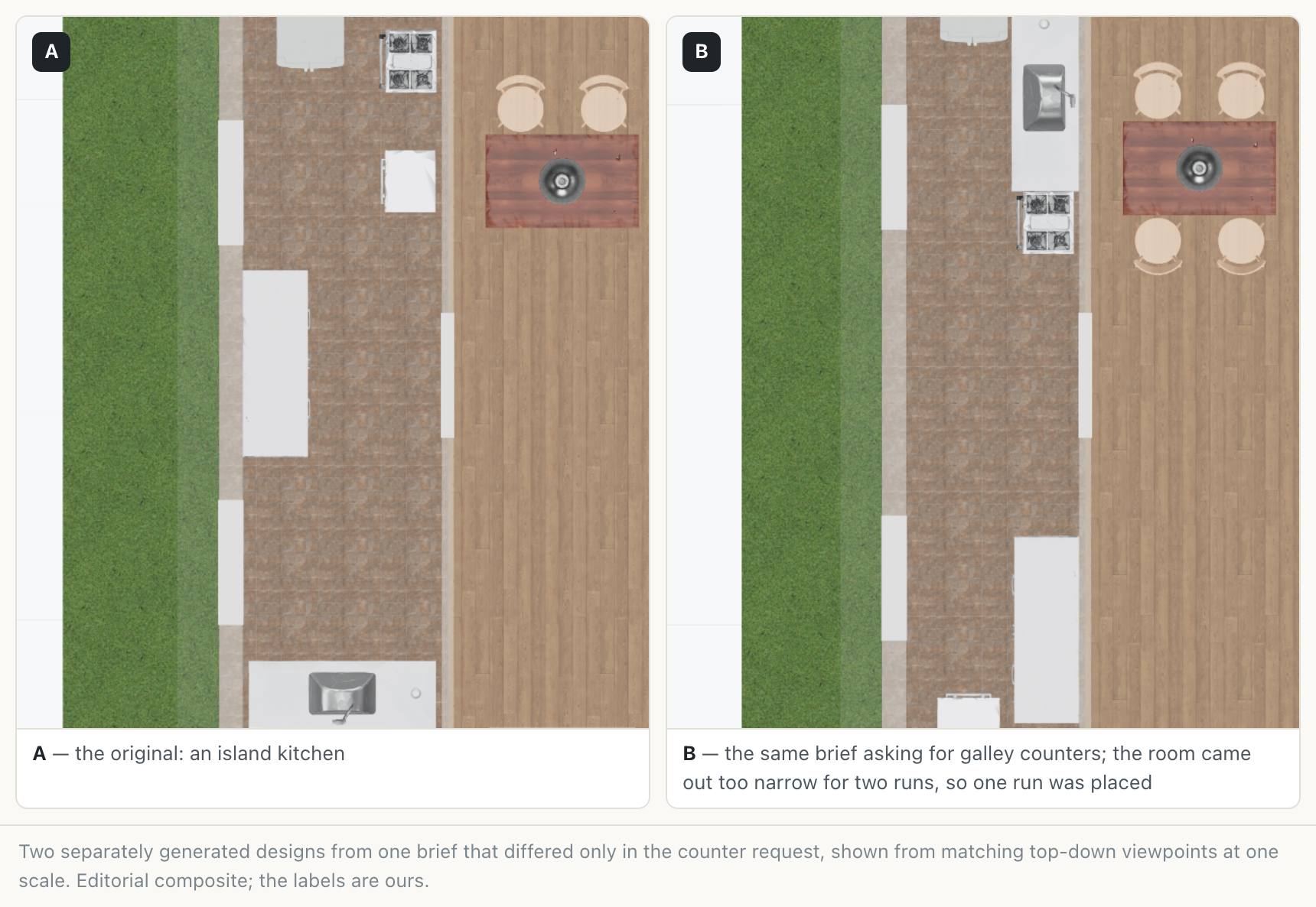
4. Compare the same decisions
Open each alternative in turn. Capture the kitchen in plan and the view from its entrance, then compare the downloaded images side by side in your usual image viewer.
Use a small review table
| Decision | What to record for A and B |
|---|---|
| Room size | Delivered width, depth, and the space left around furniture. |
| Daily route | How you reach the dining table, garden, or neighbouring room. |
| Other changes | Rooms, openings, or features affected by the revision. |
| Next step | One change you would keep or investigate further. |
5. Know what undo keeps
When Undo this turn is offered, it returns to an earlier applied generated result without using another generation. It does not restore hand edits made after that result.
Editor undo serves the current editing session and is paused while working live with others. Keep the alternatives you care about as separate saves or files, since a cloud design stores its latest scene.
Compare the quantities when it helps
A generated revision can include a quantities change log against its parent, using the same regional practice for both. It reads stored generated results, so it does not include later hand edits or compare arbitrary manually saved options. Understand the quantities comparison.
Keep exploring
Try it with your own design
Back to Refine a home design.